 Bored Scanner


What you can point it at
Box labels
The sticker on the box. Serial, part number, and Wi-Fi, Ethernet and Bluetooth addresses, from one photo, even when the label has several barcodes on it. Apple labels are built in.
Other brands' labels
Add a label profile: tell it what that label calls the serial and MAC lines, like "S/N" or "LAN MAC", and it looks for those words. Works for Lenovo, Dell or your own tags.
Asset tags
Found a laptop with your company's asset sticker on it? Lookup scans the tag and shows the model, status and who has it. Serial works too, and Wi-Fi MAC or IMEI once they're mapped.
Engraved serials
The tiny serial on the bottom of a laptop with no box in sight. If the camera can't read it, type it. Lookup doesn't need a photo.
Saved photos
Already took a picture of the label? Import it and it's read the same way, on the device.
A whole pallet
Keep shooting. Earlier photos are read in the background while you move to the next box, then wait in a queue for you to check.
How it reads a label
- Photograph the label. The whole thing. No aiming at the one right barcode.
- Read it on the device. Apple's built-in text and barcode recognition reads every line and every code, and notes where each sits on the label. Nothing is uploaded to be read.
- Match words to values. The label profile looks for the printed names, like "Serial No." and "Wi-Fi Address", and takes the value beside each one or in the barcode next to it. Country of origin, FCC IDs, copyright and marketing copy are skipped.
- Check the values. A MAC address has to be 12 hexadecimal digits. If a barcode disagrees with the printed text, or a reading is unsure or malformed, the field is flagged instead of guessed. Nothing is quietly "fixed."
- You confirm, then send. Only the fields you checked go to Snipe-IT or the CSV. With Snipe-IT, success shows only after the app reads the record back and the values match.
DEMO-001SerialDEMO-PN/APart number02:00:00:00:00:01Wi-Fi MAC02:00:00:00:00:02Bluetooth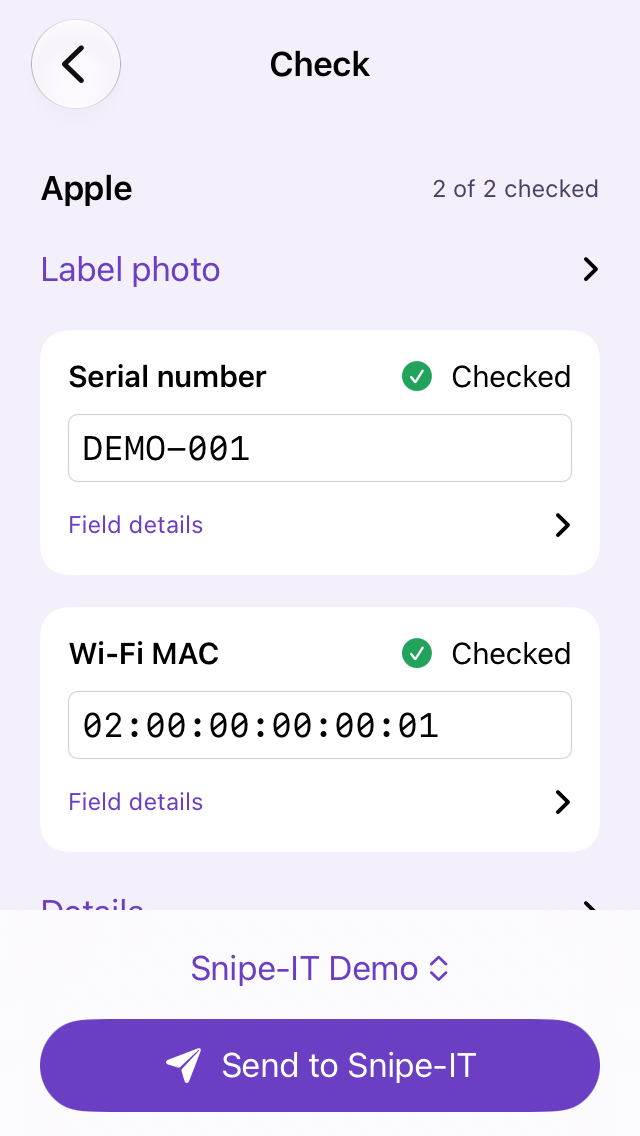
A person checks every field
Text recognition is good, not perfect. A serial that looks valid can still be the wrong serial. So every included field gets a check before it's sent, and editing a value clears its check.
- Tap the label photo to compare a value with what's printed.
- Turn off fields you never want, like Bluetooth, and they drop out of the review.
- Each photo keeps the profile it was read with. Change settings later and you can re-read it on purpose.
Screenshot uses fictional demo data.
What it won't do
- Recognize every label ever printed. Apple is built in; other labels need a profile with their wording.
- Guess. Missing, unsure and malformed values are flagged for you, not filled in.
- Send the photo. Label photos and raw readings stay on the device; only checked fields leave it.
- Blur the photo. Turning a field off stops it being captured; it doesn't redact it from the picture.